Website Redesign Checklist: 25 Steps to Protect Your SEO
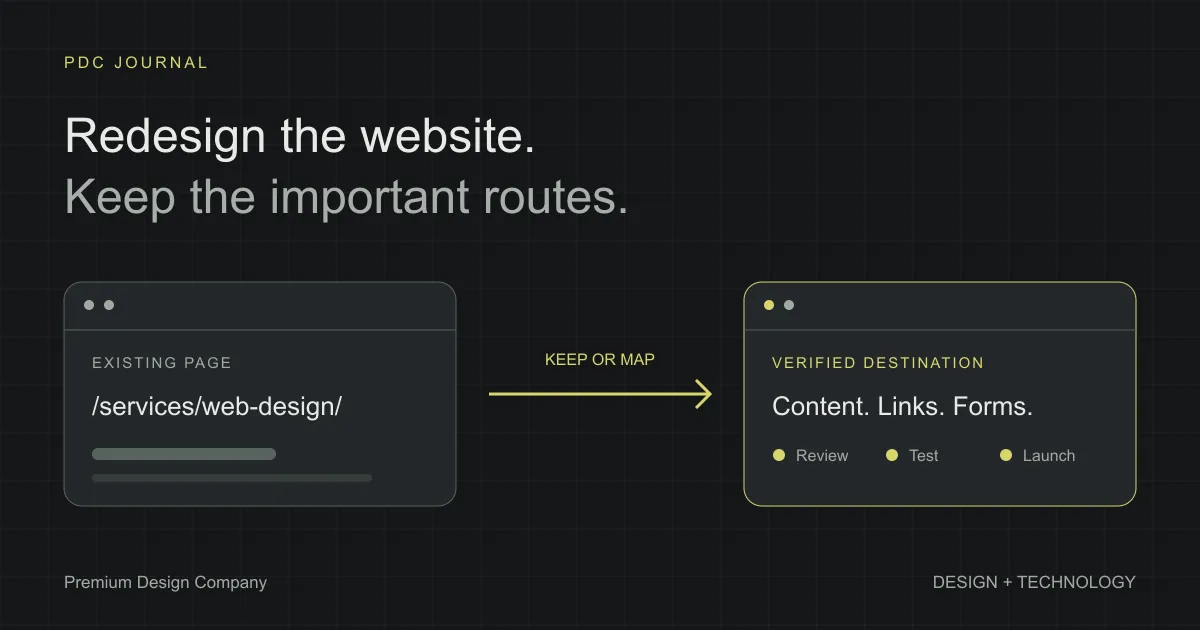
A website redesign should improve how people understand your business without breaking the routes they already use to reach it. Start with an inventory of the current site, preserve useful URLs, map any necessary changes, and test the complete journey from search result to enquiry before launch.
This checklist is for founders and small teams refreshing a service website, a SaaS marketing site or a content-heavy company site. It covers decisions to make before design starts, checks during development, and what to watch after publishing. It is a way to reduce avoidable mistakes; no checklist can guarantee unchanged rankings.
You do not need to change every part of the site at once. A clearer navigation, better page hierarchy and more readable content may solve the problem without a new domain or a different CMS. Decide what the redesign needs to achieve before choosing its tools.
Before design: agree on what needs to survive
1. Write one concrete reason for the redesign
“The website feels old” is a starting observation, not a project objective. Write the visitor problem behind it. Perhaps buyers cannot find your services, the mobile form is difficult to finish, or the homepage does not explain the product.
Choose a small set of checks for the finished site: can someone identify the offer, find relevant work and complete the next step? Keep these visible during reviews so visual preferences do not replace the purpose of the project.
2. Record a baseline before changing anything
Save the available traffic, enquiry and search data with a date. Note the reporting period, seasonality and any recent campaigns. A week of unusually high campaign traffic is a poor comparison for an ordinary launch week.
If reliable data is missing, record that gap rather than inventing a baseline. Start measuring now, and use functional launch checks while you build a useful history.
3. Make a page inventory
List existing URLs, page titles, purpose, owner and the proposed decision: keep, improve, merge or remove. Include articles, downloads, project pages and thank-you screens, not just the links in the main menu.
Give every item a destination or an explicit reason for removal. The inventory becomes the shared reference for the designer, writer and developer; decisions should not depend on someone remembering how the old site worked.
4. Preserve useful content while improving its presentation
Separate a page’s information from its current layout. An awkward page can still answer an important buyer question. Move that useful answer into the new design before deciding to delete the page.
Check service details, genuine testimonials, project attribution and contact information. A cleaner layout should not quietly remove the evidence that helps someone trust the business.
5. Keep stable URLs where practical
Changing a heading or improving a layout does not require changing the page’s address. Keep an existing, descriptive URL when it still fits the subject. That also preserves bookmarks, shared links and references in older emails.
Where a move is necessary, record it in the inventory. Google’s site-move guidance recommends preparing a URL mapping and monitoring the move; it also notes that search rankings can fluctuate during the transition.
6. Choose the content owner and editing process
Decide who updates services, articles and case studies after launch. Give that person a realistic editing path and a short handover. A CMS your team cannot maintain leaves the redesigned site dependent on another project every time a sentence changes.
Ask them to update a sample page during development. That exercise often reveals missing image guidance, confusing fields and approval steps while there is still time to fix them.
During design: make the visitor journey clear
7. Review the navigation as a set of destinations
Write each menu label next to its destination. A label that sounds polished can be less useful than a familiar one. “Services” should help visitors reach the services overview; a dedicated AI offering may deserve its own link.
Use the same meaning on desktop and mobile. Test a person arriving on an inner page, because they may never see the homepage first.
8. Give each page a clear next step
Choose the action that fits the visitor’s stage: explore work, compare services, request a consultation or send a message. Secondary actions can remain, but their presentation should not compete equally with the page’s main purpose.
Check what happens after the click. A good button label does little for the business if it opens the wrong page or sends someone to a section that does not exist.
9. Check complete page layouts at several widths
Review a phone, a laptop and a large desktop, including intermediate widths where menus or grids change. Check long titles, real project names and full email addresses rather than only short placeholder copy.
Look for horizontal scrolling, overlapping elements and controls that become hard to reach. Fixed desktop title sizes can coexist with responsive layouts; more screen space does not have to make every element larger.
10. Keep a readable heading structure
Give each page a meaningful main heading. Use section headings to organise the information below it, and reserve smaller headings for subsections. Do not choose a heading level simply to obtain a particular font size.
Read the heading outline without the body copy. It should tell a coherent story about the page and help someone find the answer they came for.
During development: verify the routes and metadata
11. Map changed URLs to relevant replacements
Use a simple table with old URL, new URL, reason and verification status. When two pages are merged, the destination should genuinely cover the useful subject of both.
For example, an old web-design service URL belongs on the replacement web-design page, not automatically on the homepage. This example is illustrative; the mapping must follow the actual content of your site.
12. Implement permanent redirects for permanent moves
Ask the developer to configure server-side redirects and test the response from the original address. Google recommends permanent server-side redirects where possible; 301 and 308 indicate a permanent move.
Do not rely only on a message saying that a page has moved. The old link should take the visitor to its intended replacement.
13. Update internal links to the final URLs
Check menus, buttons, related articles, case studies and footer links. Link directly to the final destination instead of making every visitor pass through an old address.
Include links inside article text and reusable components. A navigation component may be correct while an older paragraph still links to a removed service page.
14. Review canonical URLs
A canonical identifies the preferred version of a page when similar versions are available. Check that the new pages point to their intended live URLs, not a staging hostname or an old path. Google’s canonical documentation explains the available signals and their limitations.
Keep the canonical, internal links and sitemap consistent. Treat the field as part of the page’s publishing setup, not as something to copy blindly from the previous template.
15. Check titles and descriptions page by page
Review metadata alongside the visible content. Each title should describe that particular page, and each description should accurately summarise what the reader will find.
Pay special attention to duplicated defaults. A beautifully designed service page can still ship with a generic title inherited from a layout. Save the final title and description in the inventory so content reviews include them.
16. Confirm the indexing settings
Before launch, inspect both HTML metadata and response headers for accidental noindex rules on public pages. Keep intentional exclusions for private previews or thank-you pages where appropriate.
Google’s noindex guidance distinguishes indexing control from crawl blocking: a crawler must be able to access a page to see its noindex instruction. Check the configuration instead of assuming that robots.txt and page metadata do the same job.
17. Generate and review the sitemap
Include the public URLs you want discovered, and exclude preview or private pages. Open the generated file and check the hostname and paths after the production build.
A sitemap helps search engines discover URLs, but Google does not guarantee crawling or indexing for every entry. Useful internal links still belong in the website itself.
18. Test images and downloads
Verify that cover images, logos, PDFs and screenshots load on the production build. Check meaningful alternative text and whether important content is cropped out of smaller previews.
Keep a project’s attribution next to its screenshots. Portfolio work is evidence, and the redesigned page should make the contributor’s role easier to understand rather than leaving ownership ambiguous.
Before launch: test what visitors actually do
19. Submit every form through its normal flow
Use an agreed test submission and confirm receipt with the person who owns the inbox. Check required fields, error messages, the success page and any redirect behaviour.
Test contact, quote and consultation forms separately if the site has them. Similar-looking forms can use different endpoints or hidden fields. Record which ones have been tested rather than assuming one successful submission proves all of them work.
20. Verify tracking without overstating what it proves
Confirm ownership of the measurement account, then test both consent choices in a fresh browser. Nonessential analytics should follow the applicable consent requirements, and the privacy and cookie notices should describe the implemented setup. Check that declining or withdrawing consent behaves as intended.
For consenting test visits, confirm that the intended tag runs once and that enquiry events are attached to successful submissions. Do not send form names, email addresses, phone numbers or message text in analytics events. Keep test traffic identifiable where your setup supports it.
An event firing does not prove that a qualified lead arrived. Agree on the reporting definition, and keep completed submissions separate from button clicks when evaluating the redesign.
21. Check performance with real content
Measure representative pages after images, fonts and third-party scripts are included. Review the homepage, a service page and a content page, because their workloads differ.
Core Web Vitals cover loading, responsiveness and visual stability. Lab checks help find problems before launch; field data reflects real visits. Record which kind of measurement you are using rather than presenting one test run as every visitor’s experience.
22. Use the website with a keyboard
Move through the menu, links, forms and dialogs without a mouse. Check visible focus, sensible order and whether a visitor can open and close the mobile navigation.
Also review content when animations are reduced. Essential information should remain available instead of depending on a visual effect finishing successfully.
23. Prepare a rollback and release record
Keep the previous working release available and identify who can restore it. Record the code version, publishing time and any configuration changes.
A rollback is most useful when its limits are understood. Restoring old files may not restore a changed database or an external form setting. Review those dependencies before choosing the launch window.
After launch: verify and monitor
24. Check the live domain immediately
Repeat the critical checks on the public site: navigation, important old URLs, images, forms and success pages. A staging pass is useful, but it does not prove that the live domain uses the same configuration.
Check with a fresh browser session as well as your development browser. Record actual results and fix broken journeys before treating the release as complete.
25. Assign an owner for follow-up
Verify the site in Search Console and submit the current sitemap if those steps have not been completed. Check important URLs with URL Inspection and review indexing, manual actions and security reports alongside enquiries and unexpected errors. Compare like-for-like reporting periods, and investigate affected pages before attributing every change to the redesign.
Leave a named person responsible for the next review. Publishing is a milestone in the project, but the website remains an operating part of the business.
What should the handover contain?
Ask for the page inventory, URL mapping, editing instructions, release record and completed test checklist. These documents should be short enough that the team actually uses them. Mark untested items and unresolved issues clearly.
For a smaller refresh, some redirect or migration tasks may be unnecessary. Record them as not applicable instead of adding unnecessary work. The goal is a deliberate release whose important decisions can be explained.
If you are planning a redesign, our web design service covers the visitor journey and interface, while web development covers implementation. Start a conversation with the current site, the problem you want to solve and the pages that must survive the change.